
These assets are designed to help you properly brand your UC ANR videos. Use the specifications below to set up lower thirds and colored backgrounds, and download branded backgrounds for use as pre-roll or post-roll in your productions.
Branded backgrounds
Use these backgrounds in your videos to maintain a consistent, on-brand look.


Programmatic Branded Assets
Choose the correct video branding assets for your program or institute below, and download it for use in your videos. Email Senior Videographer Ethan Ireland at eireland@ucanr.edu for more information.
Pre-Roll and Post-Roll.
- Pre-roll is a video asset that is spliced in so it runs before the main program of a given video begins.
- Post-roll is a video asset that is spliced in so that it runs after the main program of a given video has completed.
In videos for ANR, both pre-roll and post-roll are used to provide branding information to viewers, and they exist in both horizontal (landscape) format and vertical (portrait) format. Some videos use both pre-roll and post roll, while others only use post-roll.
Choosing the Correct Branded Asset
- Horizontal Videos
- Are intended for viewers using a television or a computer monitor.
- May be in either English or Spanish
- Always use both pre-roll and post-roll.
- May use either a generic pre-roll or a programmatic pre-roll, either in English or Spanish
- Generic pre-rolls are used in videos that are not affiliated with a statewide program.
- Programmatic pre-rolls are used in videos that are affiliated with a statewide program.
- Generic Pre-Roll: Horizontal (English) / Horizontal (Spanish)
- Always use the same post-roll, either in English or in Spanish
- Generic Post-Roll: Horizontal (English) / Horizontal (Spanish)
- Vertical Videos
- Are intended for viewers using a smartphone or a tablet, usually over a social media application
- May be in either English or Spanish
- Never use pre-roll
- Sometimes use post-roll (either generic or programmatic), but not always
- Post-roll use depends on various factors dictated by the demands of the videos' final social media application
- Email UC ANR Social Media Manager for more information on how to properly format social media videos
Training videos on these topics are coming soon.
- 4-H Youth Development Program
- California Institute for Water Resources
- EFNEP
- Informatics and GIS Program
- Nutrition Policy Institute
- Research and Extension Centers
- UC Cooperative Extension
- UC Environmental Stewards
- UC Integrated Pest Management
- UC Master Food Preserver
- UC Master Gardener
- Horizontal (English) / Horizontal (Spanish)
- Vertical (English) / Vertical (Spanish)
- UC Sustainable Agriculture Research and Education Program
Lower Thirds
Lower thirds are used to identify the name, title, and affiliations of a speaker in a video.
Use the following specifications to set up brand-appropriate lower thirds in your video editing software.
- First line: Arial Black, size 40
- Second line: Arial Narrow, size 30
- Third line: Arial Narrow, size 40 bold
- Text sample/quote: Arial Narrow, size 40 bold
- Text sample/information: Arial Narrow, size 40
- Font color: ANR Blue — HEX #0055A2 (RGB 0, 85, 162)
- Sequence size: 1920 x 1080
- Frame rate: 23.97
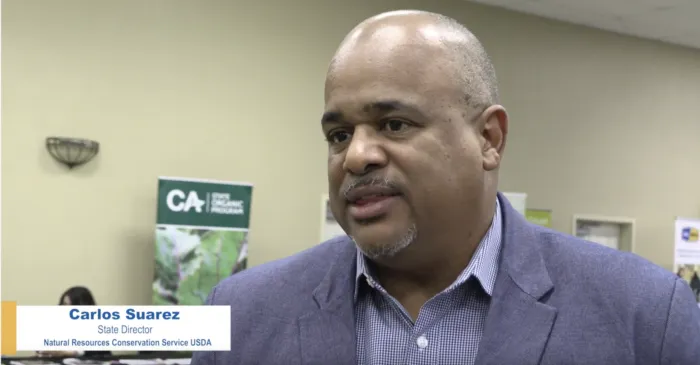
For step-by-step instructions, see how to create lower thirds.
Have questions or need assistance? Contact us.