Related Sites allow you to display links to other UC ANR Sites and Blogs that are relevant to your audience. Group Admins can select which Groups appear in the Related Sites section and control the order in which they are displayed.
If no Related Sites are selected, the section will not display.
How to Update
- Log in to IWP, find the Site or Blog you want to manage and select Edit Group
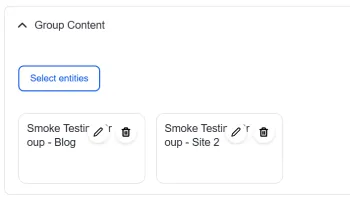
- Find the Group Content section and select Select Entities
Image

- Search for the UC ANR Sites or Blogs you want to display. You can use Title, URL Alias or Group Type to narrow the results
- Select the checkbox next to each Site or Blog you want to include. You can select multiple Groups at once
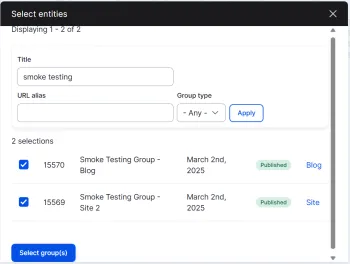
- Select Select Group(s) to add the selected Groups
- Review your Related Sites. Drag items to change their display order, or use the trash can icon to remove an item. To add additional Sites or Blogs, select Select Entities again
- Save your changes