Travel & Entertainment FAQ
Topics

Travel card do's and don'ts
Meal delivery services, P2P and booking apps
Expense report requirements
How to write an effective business purpose
Policies and Best Practices for 2026
Registration for travel outside of California
Travel Card
Please follow the policies from your Travel Card training. They're listed below:
Allowable Uses
- Travel: lodging, airfare, car rentals, etc.
- Entertainment: Food/catering related to allowable entertainment events
- Meals and incidentals: Meals and tips, gratuities, baggage fees, and other small costs associated with the business trip
- Conference registration when travel is involved, (i.e. not a virtual conference)
Unallowable Uses
- Expenses not related to travel and entertainment
- Personal travel and entertainment
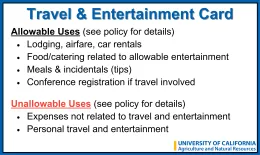
Travel Card Sleeves: The Business Operations Center (BOC) provides Travel Card and PCard RFID credit card sleeves with these policies listed on them. Please reach out to bocsupport@ucanr.edu if you would like card sleeves mailed to your office (or dropped off to your desk if you work out of the 2nd Street building). There is no charge for the sleeves or mailing them.
What happens if I accidentally used my Procurement Card (PCard) for an allowable Travel Card purchase?
- You must clear the P-Card charge from AggieExpense by importing the expense to a report. Use Report Type "Professional Expenses" and select the appropriate Expense Type. Add a comment explaining that the Procurement Card was used instead of the Travel Card.
- You must fill out an Unauthorized Purchase form in WFA to request a confirming order.
- Go to WFA and select Unauthorized Purchase in the Business Operations Center menu.
- County Office Routing:
- Purchaser
- Office Manager (Submitter in WFA)
- County Director (Director approver)
- BOC Director (Financial approver)
- Controller (Final approval)
Can I use meal delivery services for my business meeting or event?
Using Instacart, Grubhub, Doordash, etc. is acceptable, it is best practice to always have an itemized receipt. However, you cannot use meal delivery services to send meals/refreshments to Zoom meeting attendees.
Can I use Expedia.com, Hotel.com, or a similar service to book travel and accommodations?
Yes, you can use thirdparty sites. However, you must have itemized receipts. You can request a travel folio from your hotel's front desk at the time of check out.
What are the policies for using software/applications to pay for travel and entertainment expenses?
If using Venmo, Zelle, Cash App or another peer-to-peer (P2P) vendor, you need to include in your AggieExpense report a copy of the contract or business agreement from the vendor matching the bank statement from the payment service.
What do I need to include in my AggieExpense report?
- Itemized receipts: (subtotal, taxes, and fees)
- Meeting or conference agenda
- Names and roles for all attendees
If driving: Google Maps screenshots showing the number of miles traveled (see Mileage Calculation section of BOC’s Travel, Entertainment, and Relocation webpage).
- Business purpose (specific and descriptive)
If you need help with your expense report please reach out to your business partner team.
Can I combine all meals for a day of business travel on one line in the expense report?
Yes. If you combine all your meals on one line for the day, you must break down each meal in the comments with the location and the dollar amount. You must attach receipts to the AggieExpense report.
What are some examples of effective business purposes?
Effective business purposes are specific and descriptive enough for the expense report to be approved. Business purposes that we don't accept are those which are too vague. They render doubt about why the University should pay for the expense.
The following examples do not include enough detail:
- Attended Statewide Conference
- Conference Registration
- Meeting with SunGuard
- Donor meeting
- Annual site visit meeting
The following examples would be more effective:
- Attended 2018 UC ANR Statewide Conference to connect with colleagues from across the state about shared challenges, concerns, opportunities and solutions.
Why is this an effective business purpose?
It specifies when the conference happened and what topics were covered. Expense report approvers want to see that the purpose of the conference relates to the University’s mission of research, public service, or education.
- Advance registration for John A. Seed to attend the “District VII” conference hosted by CASE (Council for Advancement and Support of Education) in San Francisco, CA. Employee is attending to present his lecture on Donor Pipeline Strategies.
Why is this an effective business purpose?
It specifies which conference, what the conference is for, where it is, and why the employee is attending.
- Jeff Dines to attend the multi-day “Higher Education Summit” hosted by SunGard in Boston, MA for workshop training and networking with industry peers in the donor communications field.
Why is this an effective business purpose?
It specifies who, what, where, and why.
- Lunch meeting hosted by Martha Bows with donors to discuss future 4-H Foundation events at Seasons Restaurant.
Why is this an effective business purpose?
It specifies who, what, where, and why. The meeting agenda is required, but the business purpose still needs to include a relevant business reason for the meeting.
- Entertainment expenses incurred during the site visit by UC ANR Senior Leadership to the Westside Research & Extension Center. Expenses include catered breakfast, lunch, light refreshments, and dinner. Detailed agenda is attached.
Why is this an effective business purpose?
Specifies what the meeting was for and where it was. The agenda and attendee list are required on the expense report in addition to the business purpose.
Policies and Best Practices for 2026

In light of policy updates communicated through the recent Chancellor’s Issuance Letter pertaining to the BFB G-28 Travel Regulations, and in light of common threads in help desk requests, we’ve developed this list of frequently asked questions and policy links. Reach out to your Business Partner or Business Manager with any follow-up questions.
Travel FAQ for 2026 Policy Updates
Will the University reimburse personal item purchases during a business trip?
No. Travelers may not claim reimbursement for personal items purchased while on travel status (e.g., toiletries or clothing).
Example: You have traveled to a conference and when you arrive you realize that you have forgotten your toothbrush. The expense of purchasing a toothbrush is not reimbursable and should not be put on your Travel Card. Incidental expenses including tips and fees for services, (e.g., for waiters, baggage handlers, etc.) and Miscellaneous Travel Expenses as defined in BFB G-28 do not count as personal items.
Can I book earlier dates for travel and still be reimbursed?
Travelers may be considered on travel status for up to one additional calendar day before their planned business activities begin, if reasonable based on destination, travel time, and scheduling. Travelers may also be on travel status for up to one additional calendar day after their planned business activities end, with the same conditions and documentation.
Example: You are traveling for a conference. Your flight will be 3 hours and the conference starts at 8 am on Tuesday and ends after dinner on Thursday, which is scheduled to end at 8 pm. Under policy you could fly on Monday afternoon and fly home on Friday morning.
Can I add personal days to a business trip
If you add personal days to a business trip, you must provide a price comparison quote showing the cost of the itinerary with business days only. Reimbursement will be the lower of:
- The actual airfare paid (including personal days), or
- The quoted airfare for business days only.
Price quotes must include a timestamp showing the quote was obtained on the same day as the booking. Reimbursement requests without a timestamp, and complete screenshot of AggieExpense quotes may be denied reimbursement.
How can I obtain a comparison quote?
Steps:- Determine your official business dates and destination(s) based on your work-related itinerary.
- Identify any personal travel that you plan to add (extra days, stopovers, etc.).
*On personal days, meals, parking, lodging, or any other travel expenses will not be reimbursed. - Using AggieExpense, search for airfare as if personal travel days are not included for business-only travel dates.
- Take a screenshot showing the lowest available airfare for the same business dates and destinations.
- Ensure the screenshot includes flight details, dates, total cost, and is date/time stamped to demonstrate the quote was obtained before, or at the time of, booking airfare containing personal travel dates.
- Once you have the comparison quote, proceed to book your combined business/personal travel.
- Attach the quote and the airfare receipt to your reimbursement request when submitting travel expenses.
- Remember, you will only be reimbursed to the lowest cost airfare
Can I rent a vehicle for my travel?
When renting a vehicle, a justification must be provided explaining why a rental vehicle was necessary instead of alternative forms of transportation (such as public transit, rideshare services, or shuttles). This justification is required for all car rental reimbursements and should clearly demonstrate the business need for rental.
Example: You are traveling to a conference. You rent a car to get to and from the airport, but you will also need the car to do some location visits. When you do the AggieExpense report you will add comments to this expense line noting that you need the vehicle to get to and from the airport. You also needed the vehicle to get to multiple location visits. Renting a vehicle was more cost effective than using rideshare/taxi.Having a vehicle just sitting in a conference parking lot and only used to get to and from the airport is not acceptable.
Can I upgrade my travel?
Use of business or first-class or other higher-cost services (e.g., priority boarding or early check-in) may be authorized under limited circumstances. Refer to UC Travel Policy G-28. Documentation of such circumstances must be provided on the applicable AggieExpense report with the appropriate option selected in the drop-down Airfare Justification field.
When a traveler prefers to use a higher class than the one authorized for reimbursement, the traveler must pay the incremental cost of the airfare. In cases other than those described above, a written authorization to use business or first-class shall be obtained in advance from the VP. The traveler shall submit such authorization with the travel expense claim.
- What are UC ANR’s principles of best practice for travel?
- All employees should be good stewards of the University’s resources and be mindful of the costs associated with travel and supplies used to conduct UC business.
- Employees working from their alternate work location, per a Remote Work Agreement, are NOT considered to be on travel status and thus not permitted reimbursement of travel or meal-related expenses covered under UCOP policy G-28.
- Travel between your traditional university work location and your alternate work location is considered normal commute and thus not reimbursable, including mileage, parking, tolls, and other normal commute related expenses. This applies even on days you may be scheduled to work at one location but required to work from the other location for any reason. See Scenario 1 below.
- If you are on approved travel status (i.e. on a business trip or attending an off-site meeting or conference), travel should be calculated from your currently scheduled work location (traditional or alternate). Whenever feasible, the more economical headquarters should be selected as it while considering mileage, lodging, and other transportation expenses intended for reimbursement.
Examples and Scenarios
The following two scenarios give examples of what qualifies for reimbursement in the given context.
Scenario 1
Given context: Employee works from their alternate work location on Monday/Wednesday/Friday and from their traditional university work location on Tuesday and Thursday.
Employee drives to university office location on Monday for an all hands meeting.
Not reimbursable. Considered commute expense.
Employee drives to different university location (such as Mrak Hall on campus) on a Tuesday for official UC business.
Reimbursable for mileage and parking to/from their current work location; a department vehicle should be used if possible to avoid need for reimbursement.
Employee drives to a different location for a meeting with clients on Wednesday.
Mileage and parking are reimbursable to/from their current (alternate) work location.
Scenario 2
Given context: Employee works 100% from their alternate work location.
Employee must come to the department office to pick up paperwork.
Not reimbursable. Considered commute expense.
Employee drives to San Francisco for a conference for official UC business.
Mileage and parking are reimbursable to/from their current (alternate) work location.
Employee comes into the department office first, then goes to a business meeting on campus, then goes home.
Mileage and parking are reimbursable, but only for the amount that is greater than their normal commute between work locations.
What are the policies on out-of-state and out-of-country travel?
Travelers must register all out-of-state (including foreign) business trips. Booking travel through Connexxus preferred travel agencies and supported online booking tools, except for SWABIZ (Southwest Airlines Business) automatically registers travel; otherwise, the traveler must register travel through the UC Away travel registration portal before an out-of-state trip occurs. Registration is not required for travel within California.
There is no milage limit or time limit for out-of-state travel exceptions. All out of state travel require this registration. If an emergency occurs in your travel destination, this is how your campus Risk Management office will know you are there. Travel registration also enrolls you to receive travel alerts from UC’s security provider, Crisis24.
What should I consider when booking Basic Economy airfare?
United, American and Delta have versions of a no-frills, highly restrictive airfare called “Basic Economy.” Southwest recently added a similar fare called "Basic." The average savings of these fares are usually just under $20 and because they are available in all domestic U.S. markets, travelers should consider the restrictions carefully before booking. Some Basic Economy restrictions include:
- NO option to pick a seat, even for a fee – seats will be assigned at check-in;
- NO boarding priority, regardless of airline status or UC perks. “Basic Economy” travelers board last;
- NO carry-on bags allowed AND a possible fee of $25 if bag is too big to fit under seat;
- NO flexibility to change or cancel the flight
- Best Practice: Book the least expensive refundable flight option if plans are at risk of changing. The University’s best practice is to pick the one level up that includes a bag and is reimbursable if flight needs to changed/cancelled. Examples: SouthWest ‘Choice,’ United ‘Economy,’ American ‘Main Cabin,’ and Delta ‘Main-Classic.'
When can I claim meal expenses?
There must be an overnight stay to claim meal expenses. Meals for employees working remotely are not reimbursable expenses. No reimbursement is permitted for morale or business entertainment meal expenses related to a virtual meeting, including gift certificates or expenses from a food delivery service.
What documentation do I need for my travel expense report in AggieExpense?
Depending upon the nature of the trip, an agenda associated with the business reasons for the trip should be provided as documentation. Examples of trips that need an agenda: conference, meeting, seminar, symposium, convention. Itemized receipts for lodging, meal receipts, travel comparison quotes are also required on the expense report as backup documentation.
- Lodging
The traveler must be at least 40 miles from the headquarters location or home, whichever is closer, to be reimbursed for an overnight stay.
Registration for Travel Outside of California
Frequently Asked Questions
UC Away Instructions
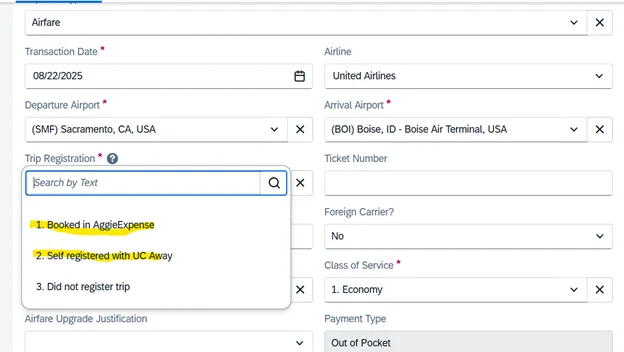
AggieExpense Trip Registration
Per UCOP Policy BFB-G-28, travelers must register all out-of-state and (including foreign) business trips. Travelers should book through Connexxus’ preferred travel agencies and supported online booking tools, except for SWABIZ (Southwest), which automatically registers travel, Otherwise, the traveler must register the trip through the UC Away travel registration portal before an out-of-state trip occurs.
Registration is not required for travel within California.
Does the international trip registration requirement apply to non-employee travelers?
Yes, trip registration for out of state travel is required for all university business travelers, whether employee or guest. Guests cannot register themselves through UC Away so a UC Davis staff member will need to process the registration for them. Remember, if a guest’s airfare is purchased through AggieExpense, their trip is automatically registered.
If booking through SWABIZ (Southwest Business), are travelers automatically registered?
SWABIZ purchases do NOT auto-enroll travelers in university insurance. You will still need to register those travelers separately in UC Away. Please note: Southwest Airlines tickets are available for purchase in AggieExpense which will automatically register the traveler.
SWABIZ and AggieExpense are two separate entities.
I purchased a flight through AggieExpense and the trip was canceled. When I reschedule my trip, do I need to re-register?
Yes. Trip registration is trip specific, so each trip needs to be registered on its own.
I am currently abroad. Do I need to register my trip?
Yes. You should register your trip via UC Away by entering the current date as the “start” of your trip and entering the corresponding end date.
I made a mistake registering my travel or changed my travel plans. Can I edit or delete an existing trip registration made through UC Away?
Trips registered through UC Away cannot be edited or deleted. You will need to register for a new trip.
I am unsure if I registered a trip. How can I check if I did?
You can check the status of your registered trips by creating a Crisis24 Horizon account. Details for establishing your account can be found in the “Welcome” email that you receive when a trip is registered (either through UC Away or by booking travel via AggieExpense). Search your Inbox for an email from support@crisis24horizon.com.
Do I need to register my Sabbatical trip?
Anytime UC is responsible for a traveler, they should be registered. UC needs to know where to send help if a natural disaster or other emergency happens.
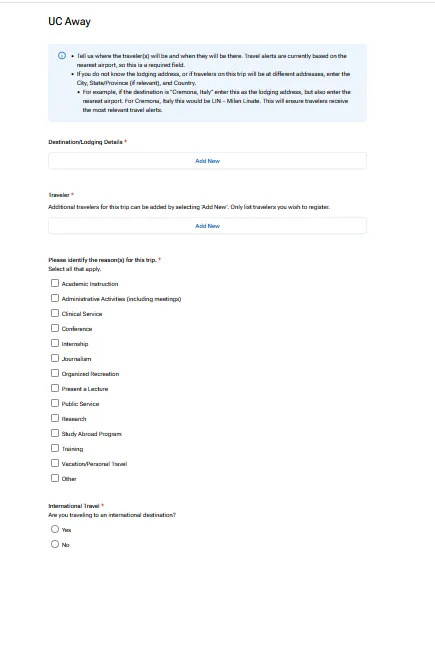
UC Away
You must use your ucdavis.edu email to log in.
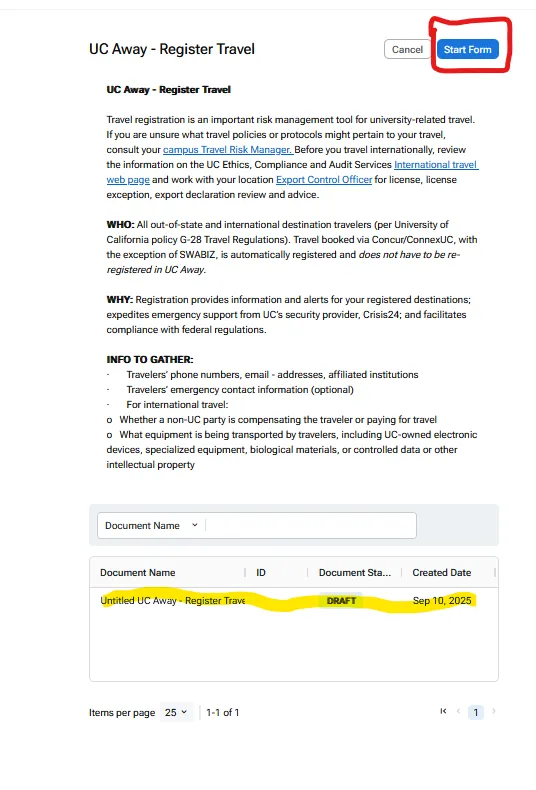
The first page will give you an overview of UC Away Register Travel and at the bottom of the page will show you all your registered trips.Use Start Form to register a new trip.
Fill out the sections on the form. You will need to rename the form and once it is filled out click the submit button on the top right corner of the page. Once submitted, it will provide you a form showing your registration. You will need to save as PDF and attach it to your expense report when you reconcile your trip. You will also receive an email confirmation that your trip is registered.
AggieExpense Trip Registration
When you choose a Destination of Out of State for Destination on your Report Header you will be required to note if you registered your trip.
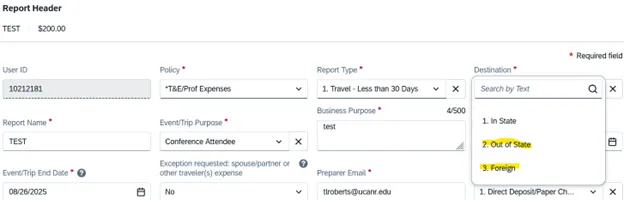
Within the expense one of the questions that is required is Trip Registration if you have not registered you will not be able to submit the report.The trip will automatically register if you book through Connexus (not Swabiz) or you must self-register through UC Away. You will receive an error in the report if you choose option 3.